If you have ever worked on a major construction project, you know that sending a Primavera P6 schedule isn’t as simple as hitting “export” and forwarding the .XER file.
Those files carry way more than just dates and tasks. Resource and cost data, risk registers, internal notes, and even baseline histories can all travel along for the ride.
Imagine sending a subcontractor a schedule that shows your internal labor rates or the rates of other subcontractors.
Definitely not ideal.
So, how do you share the right data with the right people?
That’s where cleaning your .XER comes in. It’s not just about removing information, it’s about tailoring the data in the schedule, so the recipient sees what they need to see, and nothing more.
Why Cleaning an .XER File Matters
A raw .XER file contains information about your entire project. By default, it can include:
- Resource and cost data
- Risk registers and qualitative notes
- User-defined fields (UDFs)
- Global and project activity codes
- Baselines and historical versions
- OBS/EPS structures
For internal use, sharing this information with your project team might be fine. But when this project information is shared with external stakeholders, you should be mindful of who gets access to what data.
Essential Data You Should Keep
Think of this as the skeleton that keeps the schedule understandable. Without these elements, the XER file will not be able to provide enough context needed to work with the schedule:
- Activity Names & IDs – Core to the schedule.
- Start & Finish Dates – Critical for sequencing and planning crews.
- Logic (Predecessors & Successors) – Without the logic, your schedule is just a flat list.
- WBS Structure – Even a simplified WBS helps users navigate the project.
- Calendars – Needed to interpret durations correctly.
- Constraints – Important for contractual deadlines or permit-related tasks.
- Baselines (only if needed) – the approved baseline
Data That Requires Care
Not all schedule data is appropriate for every audience involved in the project. Some data from the schedule can be sensitive in different scenarios and will require thoughtful handling.
Resource Rates & Costs
Labor rates and equipment costs are almost always sensitive. Sharing this kind of project data can reveal internal and commercial strategies.
External subcontractors rarely need these details.
Resource Names and Assignments
Subcontractors typically need to see only their assigned tasks, and do not need a broader view of the different parties involved in the project.
Risk Registers
Risk registers contain sensitive insight into contingency planning and risk exposure.
Notebook Comments & UDFs
Internal notes may often include commentary like “Claim expected” or “Subcontractor underperforming.” UDFs can store scoring, cash flow categories, or temporary planning flags. Both are usually inappropriate for external distribution. If you’re sharing the schedule outside your organization, most UDFs and notebook comments are better removed or anonymized.
Legacy Baselines
Old baselines may show repeated project slippages.
How ScheduleCleaner Helps
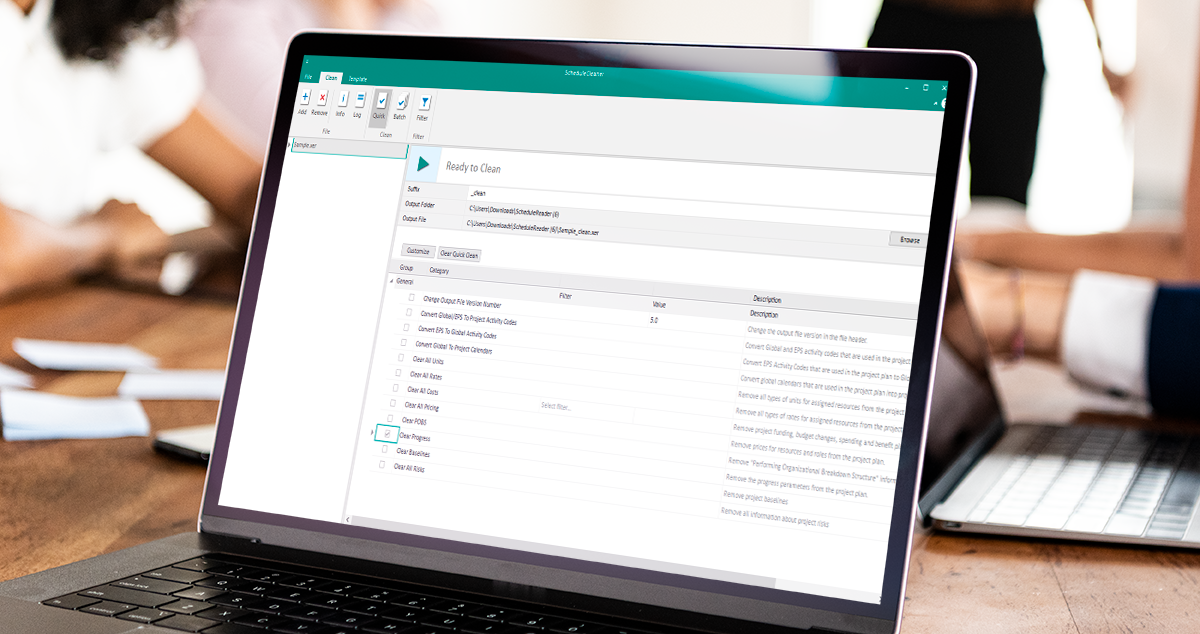
ScheduleCleaner provides a controlled and efficient way to tailor the project data in .xer and .xml files to the recipient needs before sharing the files with subcontractors, clients, or internal departments.
In each of the following scenarios, the tool helps project teams remove sensitive data and deliver only the information that the receiving party truly needs.
1. Sharing a schedule with a Subcontractor
Subcontractors generally need access only to the parts of the schedule that relate directly to their work, including relevant dates and dependencies. They don’t need visibility into cost rates, internal labor assignments, risk registers, or internal commentary. By limiting what they can see, organizations protect sensitive commercial information while still giving subcontractors exactly what they need to plan and execute their portion of the project effectively.
Subcontractor Needs: Their portion of the work, dates, and dependencies.
Not need to see: Cost rates, internal labor assignments, risk registers, or commentary.
Why: Limiting visibility protects commercial data while giving them exactly what they need to plan and execute.
ScheduleCleaner can remove all cost rates, resource details, risks, and internal comments, leaving only the activities, dates, and dependencies relevant to the subcontractor’s portion of the work.
If the schedule includes data such as Resource Names, these can also be anonymized to contain generic labels like “Engineer 01” or “Crew A.”
These modifications ensure subcontractors receive a focused schedule that supports their work without exposing any commercial or internal project insights.
2. Sending to a Client for Progress Review
Clients typically need visibility into key elements such as milestones, the critical path, and the approved baseline. However, they don’t need access to internal notes or historical baseline iterations, which are part of the project’s internal working process. Providing clients with the right level of transparency helps build trust while avoiding unnecessary contractual or perception risks that may arise from exposing too much internal detail.
Needs: Milestones, critical path, approved baseline.
Not need to see: Internal notes, historical baseline iterations.
Why: Clients need transparency but exposing too much internal detail can create contractual or perception risks.
ScheduleCleaner allows teams to remove internal notes, unused baselines, or draft iterations while keeping milestones, the critical path, and the approved baseline intact. This creates a transparent but controlled version of the schedule that maintains trust while protecting internal workflows and decision-making processes.
3. Sharing a Schedule Distributing Internally Among Departments
When sharing a schedule internally across departments, different teams often need different levels of detail. For example, the Finance department may require access to cost data, while HSE teams typically only need activity information tied to safety-related deliverables. By tailoring what each department can view, organizations reduce confusion, prevent unnecessary data exposure, and ensure that sensitive information stays protected even within the company.
Finance: May need cost data but not resource assignments.
HSE: May need only data tied to safety-related deliverables.
Why: Tailoring internal schedule access avoids confusion and protects sensitive information, even inside the organization.
ScheduleCleaner create customized schedule views tailored to each team’s responsibilities. Finance can receive a file with cost information without operational details, while HSE can receive only safety-relevant activities and deliverables. By filtering and cleaning schedule data, ScheduleCleaner helps organizations reduce confusion, maintain data privacy, and ensure that every department works with the most relevant version of the project schedule.
Final Thoughts
In construction, sharing your Primavera P6 schedule is essential for collaboration. But sharing every detail from the schedule with every party brings different risks.
Cleaning your schedule can help you to keep your data safe. This will ensure you share only the necessary data with the different project groups.
Tools like ScheduleCleaner can help you clean your schedule files and tailor the data inside the files to the needs of the different project stakeholders.