

Remove P6 Risks, Risktype Data and Risk Categories from XER Files
With ScheduleCleaner you can clean all unwanted risk categories and P6 risk type data from a .xer files in few simple steps, even if the project file has tens of thousands of records.
Risks Data in Primavera P6 XER Files
Risks are integral part of every project and consecutively, P6 risk categories, and other risk type data is present within project plans created with the Primavera P6 scheduling software.
Risks represent probable events or conditions which can negatively (or positively) affect the outcome of the project. And although we can never look into the future and predict the outcome of a project with 100% certainty, we can always identify a large number of these probable events and put procedures and practices in place in order to minimize the negative impact and the undesired consequences.
From a data and scheduling point of view, project risks represent classifications of data values that represent the different risk defined in a project. They vary in terms of their nature and are specific to each project.
When an XER file is created and exported from the P6 software, among the different data, it also contains P6 Risk data that can cause the following problems further along as the project progresses:
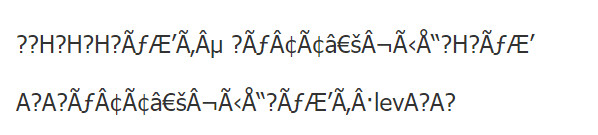
Multiple Lines of Unreadable Characters Caused by P6 Risk data
Risks are integral part of every project and consecutively, P6 risk categories, and other risk type data is present within project plans created with the Primavera P6 scheduling software.
Risks represent probable events or conditions which can negatively (or positively) affect the outcome of the project. And although we can never look into the future and predict the outcome of a project with 100% certainty, we can always identify a large number of these probable events and put procedures and practices in place in order to minimize the negative impact and the undesired consequences.
From a data and scheduling point of view, project risks represent classifications of data values that represent the different risk defined in a project. They vary in terms of their nature and are specific to each project.
When an XER file is created and exported from the P6 software, among the different data, it also contains P6 Risk data that can cause the following problems further along as the project progresses:
Decreased Performance of the Database Import Process
Two categories of project data exist in a Primavera P6 XER file which can significantly slow down database import process.
These project categories are the POBS tables, which stands for Performing Organizational Breakdown Structure and the Risks tables associated to the .xer project file.
The Solution – Remove P6 Risk, Risk Categories and Risktype Data from XER Files
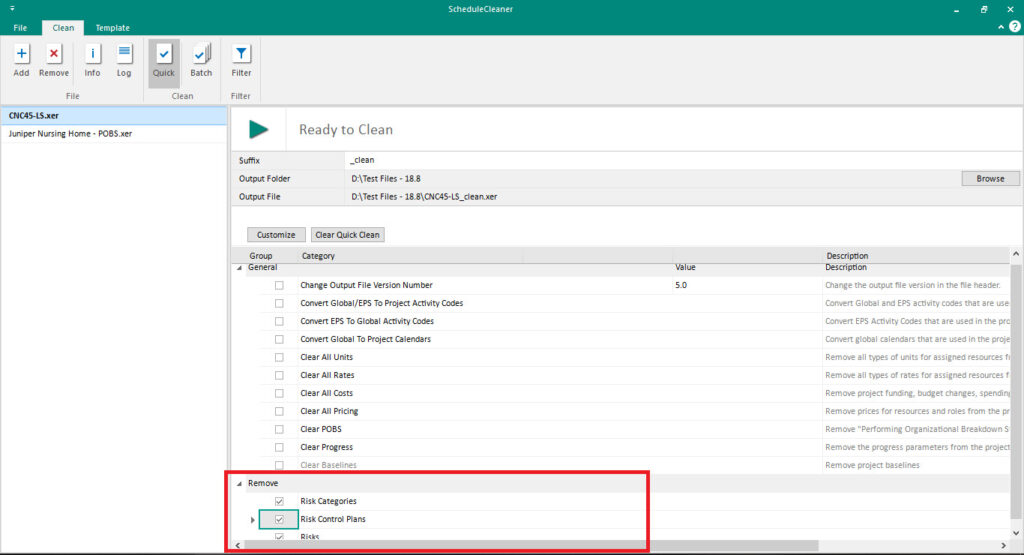
ScheduleCleaner is a tool that can help you by clean all unwanted risk categories and P6 risk type data from a .xer files in few simple steps, even if the project file has tens of thousands of records.
- Add the file into the application.
- Click on the “Customize” button to add the desired categories for cleaning.
- Select the Risk categories and click on the OK button.
- The newly risk categories will be added under the “Remove” header.
- Select the categories and click on the “Remove” button.
The Outcome
Faster XER File Import to Database
Same as with POBS data, after removing the risks, the .xer file gets lighter and it is faster to import it into a database.
A Clean P6 Database
Corrupted XER files due to risk data can pollute the P6 database and disrupt its integrity. Sharing corrupted files can harm multiple databases. RISK data can be easily spotted and removed from an existing .xer file, before the process of importing the file in a database.
After the files are imported into the P6 database, it is more difficult to remove this data, as manual intervention may be required, which is another reason why having a secure filter like the ScheduleCleaner is highly recommended.
Ready to Get Started?
We would be happy to show you how ScheduleCleaner can help you clean and share XER schedules with confidence.