


ProjectCleaner

Control the Project Data Shared in MPP Files

ProjectCleaner is an add-in for Microsoft® Project that allows project managers to remove or anonymize the confidential data within .MPP files, prior to sharing the project plans with teams and external project stakeholders.

https://www.traditionrolex.com/33

Secure Sharing of Confidential Data in .MPP Files

The application is designed to give project managers the ability to remove or anonymize data inside .mpp files.

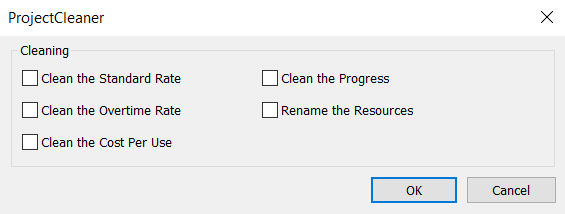
Users are able to remove or anonymize data values of project categories such as:

How Does Project

Cleaner

Work ?

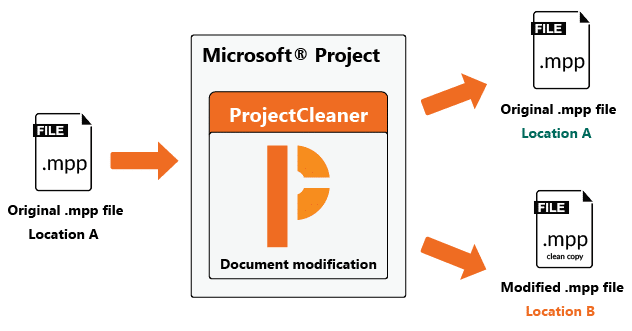
When “cleaning” .mpp files, ProjectCleaner creates a copy of the original project plan and all the modification performed to the file are saved in a new filtered .mpp file, ready to be shared with project teams and external stakeholders.

This approach ensures that the project plan’s integrity is kept and provides a solution to the major security and privacy concerns when sensitive data is being shared in the .MPP file format.

Watch the Video: ProjectCleaner in Action

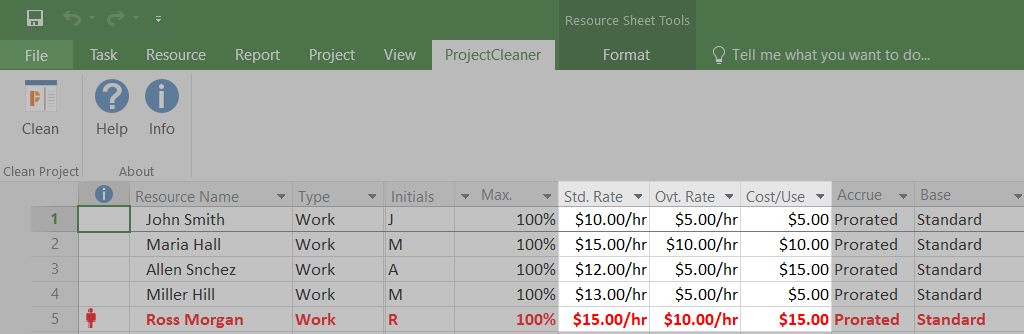
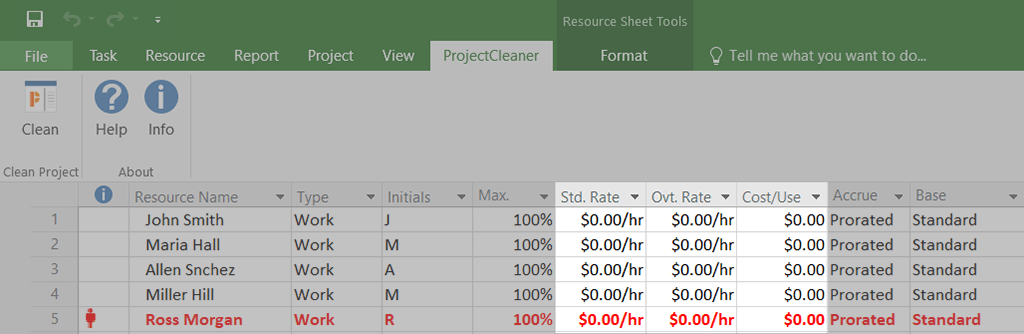
Case: Remove The Cost Rates of a Resource

Original .Mpp File
After Cleaning the .Mpp File with ProjectCleaner

Book a Demo

We would be happy to show you how ProjectCleaner can help you clean and share MPP project files with confidence, saving you valuable time and money. The online demonstration should take no more than 30 minutes. 

During that time, you will get:

  • General introduction
  • How to work with the software
  • The benefits of using ProjectCleaner
  • Pricing details and how to purchase

Fill the form, and one of our account managers will contact you within 24 hours.

[zohoForms src=https://zfrmz.eu/8XdXA6wKqup6ChQ5rApI width=100 type=js height=760px autoheight=true/]

Frequently Asked Questions

What is an MPP file format in project management?

The MPP file format is the standard file extension used by Microsoft Project to store project plans, timelines, and resource data.

These files are regularly shared between project teams and external stakeholders to communicate scheduling expectations and progress.

Why should I clean or anonymize an MPP file before sharing?

Standard MPP files often contain confidential business information, such as internal labor costs, work rates, and sensitive resource names. Cleaning or anonymizing these files addresses major privacy concerns and ensures that external clients only see the data you intend to share.

What specific data can be removed from an MPP project plan?

ProjectCleaner allows you to selectively scrub several categories of confidential information directly from your project plans. You can easily remove or anonymize the cost rates for a work resource, the specific names of your work resources, and detailed work progress data.

Do I need Microsoft Project to clean an MPP file?

Yes, Microsoft Project is required because the cleaner functions directly as an add-in for the Microsoft Project application. Once installed, it allows you to filter out sensitive data and save a clean copy of your .MPP file directly from within the software's native interface.