

Best Practices for Cleaning and Preparing XML Files for Collaboration
Collaboration is key to achieving project success in project management. For project managers, project schedulers, project controllers, and PMO (Project Management Office) professionals, effective collaboration often depends on the ability to share accurate and well-structured data. XML files are a well-known choice for data exchange due to their flexibility and compatibility across various systems. However, to ensure seamless collaboration, it is crucial to clean and prepare XML files properly. This article outlines best practices for cleaning and preparing XML files, ensuring they are ready for collaboration and integration in project management workflows.
Why Clean and Prepare XML Files?
XML files are widely used for data exchange because of their structured and human-readable format. However, they can become cluttered with unnecessary data, errors, or inconsistencies, especially when generated by different systems or manually edited. Poorly prepared XML files can lead to import errors, data corruption and miscommunication among team members. Cleaning and preparing XML files ensures that they are accurate, consistent, and optimized for collaboration, reducing the risk of errors and improving efficiency.
Best Practices for Cleaning and Preparing XML Files
Before making any changes, validate the XML file to ensure it adheres to the correct schema and structure. XML validation checks for syntax errors, missing tags, or incorrect formatting, which can cause issues during import or integration. Tools like XML validators or built-in validation features in software like Primavera P6 can help identify and fix structural issues. Additionally, if the XML file is based on a specific schema, ensure it complies with the schema requirements.
Remove, convert & anonymize sensitive P6 data in seconds.
Scrub costs, rates, resource names, POBS & risks from XER/XML files before you share.
Start Free Trial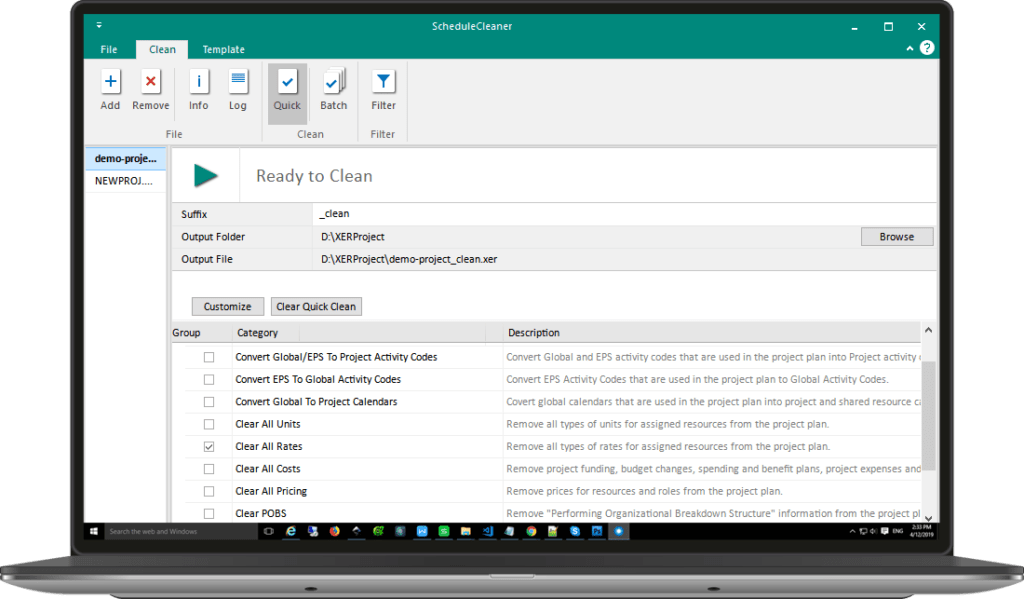
XML files often contain redundant or irrelevant data that can clutter the file and slow down processing. Removing unnecessary data streamlines the file and makes it easier to work with. Eliminate tags that do not contribute to the project data, such as empty fields or duplicate entries. Exclude data that is not relevant to the collaboration, such as internal notes or system-generated metadata. This step ensures that the XML file contains only the essential information needed for collaboration.
Inconsistent data formats can lead to confusion and errors during collaboration. Standardizing data formats ensures that all team members interpret the data correctly. Ensure all date and time fields follow a consistent format, such as YYYY-MM-DD. Use standardized naming conventions for tasks, resources, and other project elements. Align numeric values, such as costs and durations, to a consistent level of precision. Standardization minimizes the risk of misinterpretation and ensures clarity across teams.
Data inconsistencies, such as mismatched IDs or missing dependencies, can disrupt project workflows. Resolving these issues ensures that the XML file is accurate and reliable. Identify and fill in any missing fields, such as task names, resource assignments, or dependencies. Ensure that all IDs, such as task IDs and resource IDs, are unique and correctly referenced throughout the file. Validate task dependencies to confirm they are correctly defined and free from circular references. Addressing these inconsistencies ensures the integrity of the project data.
Large XML files can be inconvenient to share and process, especially in collaborative environments. Optimizing the file size improves efficiency and reduces the risk of performance issues. Use compression tools to reduce the file size without losing data integrity. For extremely large datasets, consider splitting the XML file into smaller, more manageable files. Eliminate unnecessary whitespace and line breaks to further reduce file size. These optimizations make the file easier to handle and share.
Different systems may have specific requirements for XML files. Ensuring compatibility with the target system prevents import errors and data loss. Verify the XML file format and structure required by the target system, such as Primavera P6 or Microsoft Project. Before sharing the file, test its import into the target system to ensure it works as expected. Leverage system-specific tools, which some project management software offers, to clean and prepare XML files for compatibility. This step ensures that the file can be seamlessly integrated into the target system.
Maintaining a record of changes and metadata helps collaborators understand the context and history of the XML file. Use XML comments to document changes, assumptions, or special considerations. Include metadata, such as the file creator, creation date, and version history, to provide context for collaborators. Track revisions using version control systems to ensure that collaborators are working with the latest version of the file. Documentation enhances transparency and facilitates smoother collaboration.
Before sharing the XML file with collaborators, test it in a simulated collaborative environment to identify and resolve potential issues. Share the file with a small group of collaborators to test its compatibility and usability. Collect feedback from collaborators to identify areas for improvement. Make necessary adjustments based on feedback and retest the file. This iterative process ensures that the XML file is fully optimized for collaboration.
Practical Applications in Project Management
When migrating project data between teams using different tools, a clean and well-prepared XML file ensures that all critical information is accurately transferred. For example, a project manager can export data from Primavera P6 into an XML file, clean and prepare it, and share it with a vendor using Microsoft Project. This process ensures that both parties have access to consistent and accurate project data.
XML files are often used to integrate project management tools with enterprise systems like ERP or CRM platforms. Cleaning and preparing the XML file ensures that the integration is smooth and error-free, enabling real-time data synchronization. This integration enhances decision-making and improves project outcomes by providing stakeholders with up-to-date information.
Project controllers and schedulers can use cleaned XML files to generate custom reports and perform advanced analytics. By ensuring the data is accurate and consistent, they can produce reliable insights that support decision-making. Custom reports tailored to specific project needs provide valuable information for monitoring progress and identifying potential risks.
In multi-organization projects, XML files facilitate collaboration by providing a standardized format for data exchange. Cleaning and preparing the file ensures that all parties have access to accurate and consistent project information. This standardization reduces the risk of miscommunication and ensures that all stakeholders are aligned.
Final Thoughts
Cleaning and preparing XML files is a critical step in ensuring effective collaboration in project management. For project managers, schedulers, controllers, and PMO professionals, following these best practices ensures that XML files are accurate, consistent, and optimized for sharing and integration. By validating the file structure, removing unnecessary data, standardizing formats and resolving inconsistencies, you can create XML files that enhance collaboration and drive project success.
In an era where data-driven decision-making and seamless collaboration are paramount, mastering the art of preparing XML files is an invaluable skill. By adopting these best practices, project professionals can streamline their workflows, reduce errors, and foster stronger collaboration across teams and systems. Clean and well-prepared XML files not only improve efficiency but also contribute to the overall success of projects, ensuring that all stakeholders have access to reliable and actionable data.
For there is a need to anonymize some sensitive data, ex. resources name, try out 15-day free trial of ScheduleCleaner and do it within few clicks.

The Synami team is the collective voice behind Synami’s project management solutions, providing guidance, tips, and industry expertise to help teams plan, manage, and deliver projects more effectively.